
How Not to Partition Data in S3 (And What to Do Instead)
Learn the pitfalls of partitioning data by date in S3

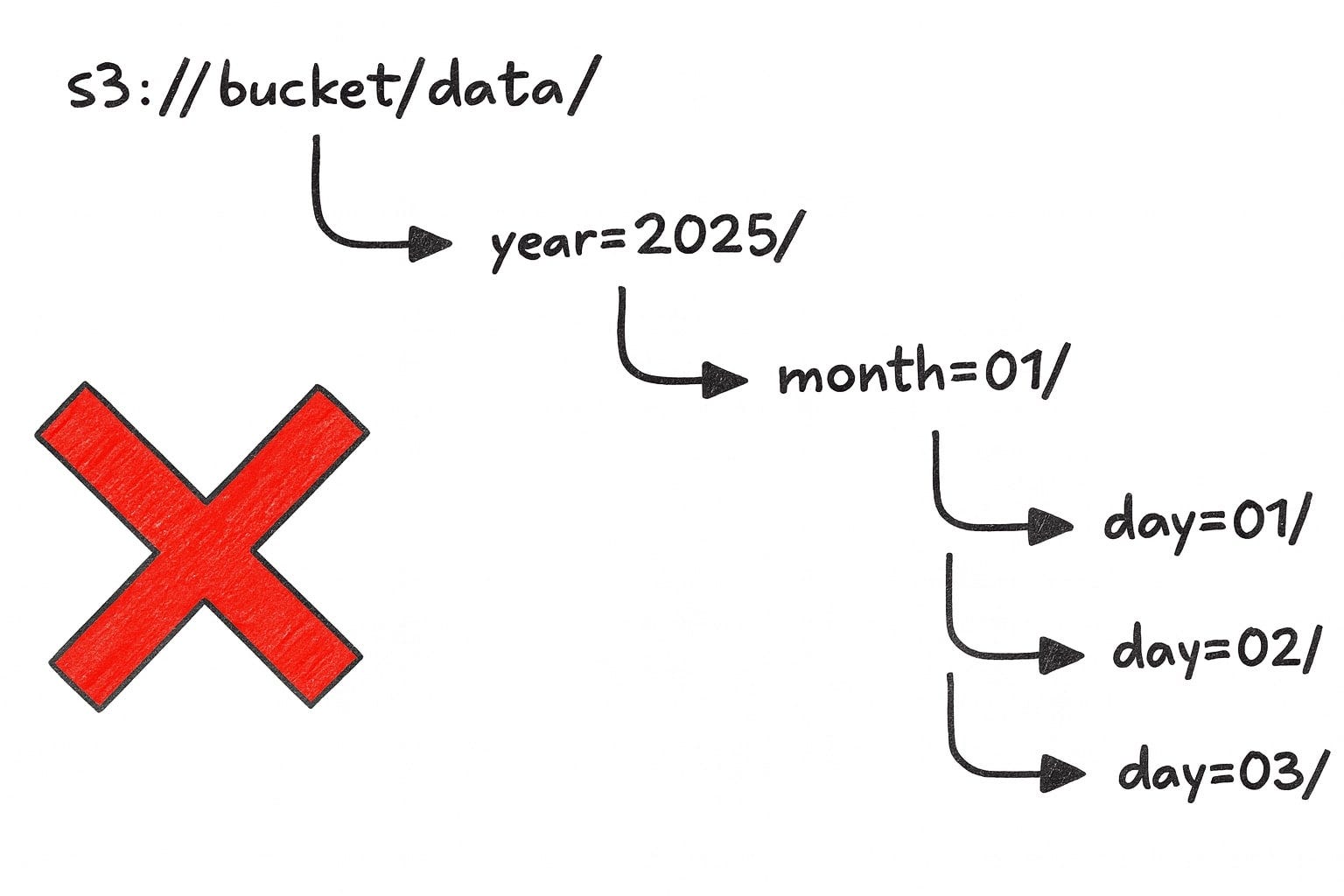
Every data engineer eventually faces this moment: you’re designing a new data lake, and someone confidently suggests, “Let’s partition by year, month, and day!”
It sounds perfectly logical. After all, that’s how we naturally organize time-based information. But in the world of S3 and cloud data lakes, this seemingly innocent decision can lead to a world of pain.
I learned this lesson the hard way, and I’m sharing my experience so you don’t have to repeat my mistakes. Don’t do this:
How Not to Partition
Early on in one of my past projects, we structured our S3 data like this:
s3://bucket/data/year=2025/month=01/day=01/events.parquetIt looked beautiful. The hierarchy was clear. Business analysts could browse the data easily. Everyone loved it ... until they actually needed to query the data.
We thought this setup was efficient — until the moment we tried answering this simple request:
“Can you pull all data from January 1st, 2024 to February 10th, 2025?”
Easy, right? Nope.
With our nested partitioning, the query engine needs to generate something like this:
WHERE (year = ‘2024’ AND month = ‘01’ AND day = ‘01’)
   OR (year = ‘2024’ AND month = ‘01’ AND day = ‘02’)
   OR ...
   OR (year = ‘2025’ AND month = ‘02’ AND day = ‘10’)
If you enjoy writing queries that look like they were auto-generated by a monkey, this approach is for you. Otherwise, avoid it at all costs.
Here’s what went wrong:
❌ Query complexity. Each additional day adds another OR clause.
❌ Partition pruning fails. Query engines scan way more partitions than necessary. Query optimizer can’t efficiently skip irrelevant data partitions based on filters (like date ranges).
❌ Query length limits. Athena and Presto have query length limits — with the partitioning you WILL hit them. At one point, we were querying across 100+ days, and Athena simply refused to run the query.
❌ Performance tanks. More partitions → more API calls to S3 → more latency.
Excuses People Used
When we suggested fixing this, people resisted. Here are three common excuses I kept hearing — and why they’re nonsense.
1. “But This is How Hive Does It”
Yeah, and Hive was designed for HDFS, not S3.
Hive-style partitions (year=YYYY/month=MM/day=DD) work fine in on premise environments where metadata is tightly coupled to storage. But in S3-based query engines like Athena, Trino, and Spark, this structure just means:
More partitions → More metadata scanning
More S3 API calls → Higher latency
Worse performance in every way
HDFSS3 Metadata in NameNodeNo centralized metadata Fast directory listingsEach LIST is an API call Hierarchy is physicalHierarchy is logical
S3 is not HDFS. Treat it differently.
2. “But It’s Easier to Query a Single Year or Month”
Sure, you can write:
WHERE year = ‘2024’But let’s be honest — how often do you do that? Compared to how often you need:
WHERE dt BETWEEN ‘2024-01-01’ AND ‘2024-12-31’Optimizing for the rare case of “get me all data from a single month” at the cost of making 99% of queries painful is a terrible tradeoff.
3. “It Helps with Partition Pruning”
S3 doesn’t care about your organizational preferences. It’s optimized for:
High throughput
Parallel access
Scalability
Your neat folder hierarchy actually works against these optimizations.
Efficient partition pruning happens when query engines can eliminate entire partitions using simple range filters. But with year/month/day partitioning, unless you specify all three values, queries tend to scan way more partitions than necessary.
Example:
WHERE year = ‘2025’ AND month = ‘01’Many query engines won’t prune at the day level, meaning they scan all days in that month, even if you only wanted a few.
I had that problem. A simple query — fetching one month of data — was running 20x slower than expected.
We spent hours debugging:
File sizes? Normal.
Compression settings? Optimal.
Concurrency settings? Fine.
Partition count? 110,000. Wtf?
The query engine had to scan thousands of partitions just to pull a few million rows. Each partition lookup triggered an S3 API call, adding unnecessary latency.
The Correct Way to Partition by Date
So, what’s the alternative? Simple: partition by full date (or datetime).
Instead of breaking your partitions into separate year, month, and day chunks, store the date in ISO 8601 format in a single partition key. Your object keys will look like this:
s3://bucket/data/dt=2025-01-01/events.parquetIf you write your dates in the ISO 8601 format, you will end up with dates in alphabetical order, so all of your range queries will work correctly:
WHERE dt >= ‘2025-01-01’ AND dt <= ‘2025-02-10’Isn’t it beautiful when dates work like dates? ISO 8601 date format (YYYY-MM-DD) sorts naturally.
You may say that now, it is more difficult to get every value for 2025. I agree that WHERE dt >= ‘2025-01-01’ AND dt <= ‘2025-12-31’ is a little longer than WHERE year = ‘2025’, but I think that shortening the notation in a few special cases is not worth the additional effort on a daily basis.
Another benefit of the system is that modern query engines can prune partitions more effectively because each partition maps directly to a specific date or datetime range.
Wrapping it up
Partitioning by year, month, and day might look tidy on paper, but it’s a trap for anything beyond the simplest queries. Instead, use ISO 8601 date-based partitions for cleaner queries, better performance, and fewer headaches.